5 mins read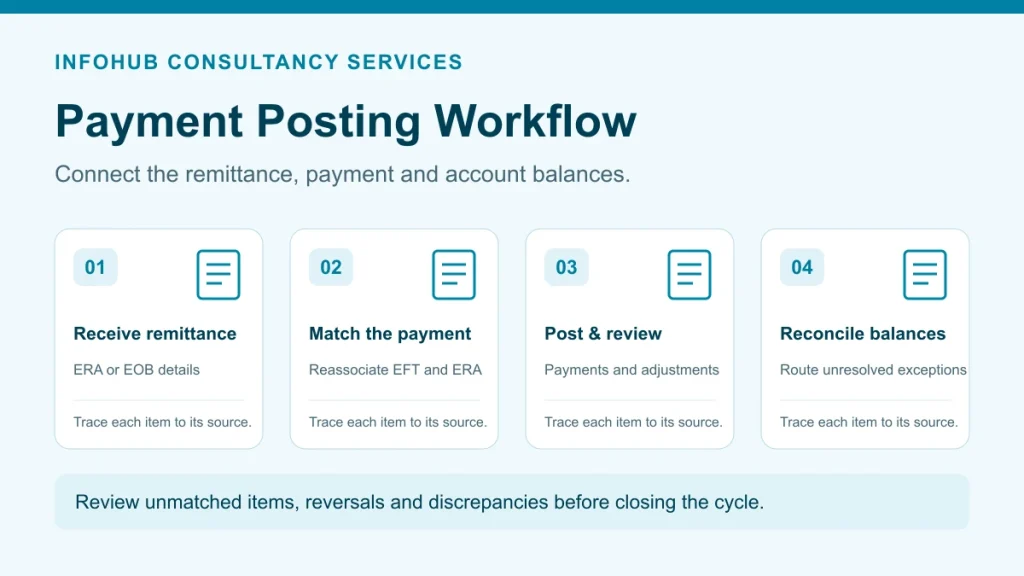
Payment posting is the control point where payer and patient transactions become usable account balances. A reliable payment posting process in medical billing records what was paid, what was adjusted, who is responsible for the remaining balance and which exceptions need follow-up. The goal is not simply to enter a payment; it is to make the practice-management system agree with the remittance and the deposited funds.
This guide explains the workflow for billing managers and practice leaders. Organizations that need daily processing support can review ICS payment posting services for US healthcare providers.
InfoHub Consultancy supports medical billing, coding, and revenue-cycle workflows for U.S. healthcare providers. Discuss your needs and proposed scope with our team.
Get a Free Consultation →What enters the payment posting workflow?
The posting team normally works from an electronic remittance advice (ERA), a paper explanation of benefits or standard paper remittance, an electronic funds transfer record, check information and patient-payment reports. Before posting begins, the team should confirm that the payer, payment date, trace or check number, deposit amount and billing entity match the correct batch.
CMS explains that an ERA or standard paper remittance reports claim adjudication and payment information, including the reason and value of adjustments. For electronic remittance, adjustment information can include group codes, Claim Adjustment Reason Codes (CARCs) and Remittance Advice Remark Codes (RARCs). See the CMS payment and remittance advice overview.
Seven steps in the payment posting process
- Receive and identify the remittance. Match each ERA, EOB or paper remittance to the correct payer, tax entity and deposit. Record the payment reference so another reviewer can trace the batch.
- Reassociate payment and remittance. For electronic payments, compare the EFT trace information with the related ERA. CMS describes reassociation as matching the payment to the correct remittance advice; the adopted ERA transaction standard is X12 Version 5010 (835). See the CMS EFT and ERA operating-rules page.
- Post claim and line-level results. Record the allowed amount, payer payment, contractual adjustment, deductible, copayment, coinsurance and other adjudication results against the correct claim or service line.
- Interpret adjustments. Use the remittance codes and payer information to identify contractual adjustments, patient responsibility, denials, reductions, reversals or other exceptions. Do not convert an unclear adjustment into a write-off merely to close a balance.
- Route exceptions. Send denied or underpaid items to the appropriate work queue with the remittance details attached. Clear ownership connects posting with denial management and accounts-receivable follow-up.
- Update the remaining balance. Transfer valid patient responsibility to the patient-balance workflow and coordinate with patient statement services. Secondary-payer balances should follow the practice’s coordination-of-benefits process.
- Reconcile and close the batch. Compare the posted total with the payment and deposit records. Document any variance, unapplied cash, provider-level adjustment or unmatched transaction before the batch is closed.
ERA auto-posting versus manual posting
ERA auto-posting can reduce repetitive entry when payer mapping, adjustment rules and account matching are configured correctly. It does not remove the need for review. Exceptions such as an unmatched claim, unusual adjustment, reversal, provider-level balance, duplicate payment or unexpected zero-pay result should move to a controlled work queue.
Manual posting remains useful for paper remittances, nonstandard files and transactions that cannot be matched confidently. The important distinction is not “automatic is always better.” The safer design is straight-through posting for validated transactions and human review for exceptions.
Daily payment posting quality checklist
- Every batch has a payer, date, payment reference and deposit amount.
- The ERA or EOB is matched to the correct claims and service lines.
- Contractual adjustments and patient responsibility use the correct categories.
- CARC, RARC and group-code information remains available for follow-up.
- Denials, underpayments, reversals and zero-pay claims have named work queues.
- Unapplied or unidentified cash is tracked instead of being hidden in a write-off.
- The posted batch total reconciles to the payment and deposit record.
- A reviewer can trace who posted, reviewed and resolved each exception.
Why accurate payment posting matters
Posting accuracy affects more than the balance shown on an account. An incorrect payment, adjustment or patient-responsibility amount can send the wrong balance to a secondary payer or patient, hide an underpayment, delay denial follow-up and make deposit reconciliation unreliable. A controlled workflow therefore connects every posted result to its remittance, payment reference and resolution queue.
Teams should review exceptions rather than forcing them through automated rules. Reversals, duplicate payments, unmatched claims, unusual adjustments and zero-pay remittances need documented ownership so that A/R and denial teams receive complete information. Organizations that want an India-based operating team can review ICS payment posting services.
Metrics that reveal posting problems
Useful operational measures include the number and value of unreconciled batches, unapplied cash, posting lag, unmatched transactions, exception aging and the percentage of items routed without complete remittance information. These measures should be interpreted with the practice’s payer mix, posting volume and workflow rules; a universal benchmark can hide local process problems.
Payment posting is also an early-warning source for the wider revenue cycle management process. Repeated adjustment or denial patterns can reveal upstream eligibility, authorization, coding, charge-entry or claim-submission issues.
Choosing a payment posting delivery model
A practice may retain posting in-house, use a dedicated offshore team or include it within a broader billing arrangement. A dedicated medical billing FTE team can suit organizations that want named capacity and direct queue ownership. A percentage-based medical billing model may suit practices that want fees aligned with collections. The right option depends on transaction volume, system access, exception complexity, internal oversight and the scope retained by the practice.
Need help defining the workflow? Discuss your payment posting requirements with ICS. We can map inputs, exception queues, reconciliation controls and reporting responsibilities before a delivery model is selected.